OBS Overlays
An OBS chat overlay for every platform you stream to
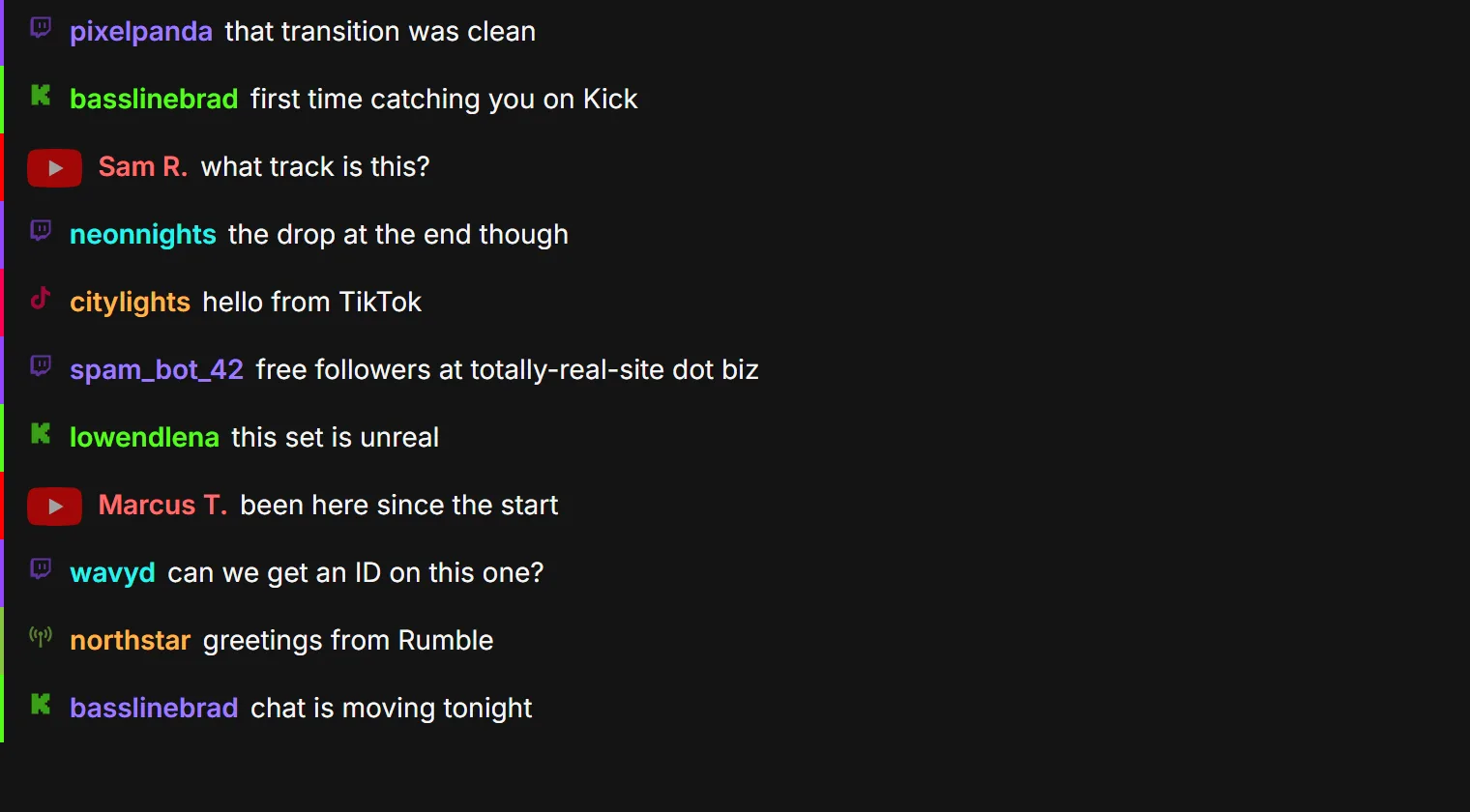
Show your whole audience on screen, not just one platform. ModMind's chat overlay merges every connected chat into one browser source for OBS.
What you can set
Which platforms appear
Show them all, or only the ones you want on screen.
How it looks
Text color, font size, position, and a fade or slide entrance.
How much it holds
The maximum messages on screen, and how long each one stays.
Who said it and where
Toggle avatars, badges, custom supporter badges, and a platform icon or color bar.
Emotes
Emotes render in the overlay, including 7TV and BetterTTV.
More than chat
The same system has a Hello Queue and a Subathon timer with its own styling.
Set it up in OBS
Create an overlay in ModMind and adjust it. Copy its URL. In OBS, add a Browser source and paste the URL.
Questions
Does the overlay work with platforms other than Twitch?
Yes. It can show chat from Twitch, Kick, YouTube, TikTok and Rumble together, or any mix of them.
Can anyone with the link control my stream through the overlay?
No. Overlays are display-only.
Is it free?
Yes. ModMind is free to use. An optional membership from $3 a month helps keep it running.
Bring your chat and your mods together
ModMind is free to use. Connect your platforms and invite your team.